On this page
Why Port 80 Is Required for ACME HTTP-01 Renewals: Troubleshooting AWS Ingress and Port 443 Failures
A production debugging runbook for diagnosing ACME HTTP-01 validation drops, intermediate certificate breaks, ALB redirect loops, and NLB protocol mismatches on AWS.
Production Reference Card
- Covered Architectures
- AWS CloudFront + ALB, AWS NLB (L4 Passthrough) + EKS Ingress, ALB TLS Offloading, AWS ACM Custom Imports
- Core Specifications
- RFC 8555 (ACME Section 8.3), RFC 8737 (TLS-ALPN-01)
- Observed Error Signatures
ERR_SSL_PROTOCOL_ERROR,ERR_TOO_MANY_REDIRECTS,x509: certificate signed by unknown authority,SSL3_READ_BYTES: handshake failure,ACME HTTP-01 403/404/Timeout- Primary Diagnostic Tools
openssl s_client,curl -Iv -IL,aws elbv2,aws ec2,aws wafv2,kubectl,dig
Production Incident Profile: Expired Port 443 Certificates from Port 80 Lockouts
A representative production failure scenario unfolds when a customer-facing TLS endpoint expires unexpectedly despite port 443 being open and responsive.
During initial triage, telemetry indicators often appear contradictory:
- Inbound port 443 traffic is permitted in AWS Security Groups and accepts TCP connections.
- The AWS Application Load Balancer (ALB) HTTPS listener reports healthy backend targets.
- Application pods inside the Kubernetes cluster run without restarts or resource pressure.
Checking the certificate custom resource inside the cluster reveals an unrenewed certificate:
kubectl get certificate api-example-tls -n productionNAME READY SECRET AGE
api-example-tls False api-example-tls 60dTracing configuration changes often highlights the contributing change: a security hardening update removed port 80 from external Security Groups and load balancer listeners under the assumption that plaintext HTTP has no place in a modern production deployment.
Port 80 is not required for standard TLS termination on port 443. However, under RFC 8555 Section 8.3, the ACME HTTP-01 challenge protocol requires verification servers to initiate domain validation queries exclusively over HTTP on port 80. When port 80 is closed at the perimeter, Let’s Encrypt and cert-manager cannot complete validation. Background renewal attempts fail quietly until the certificate reaches its expiration timestamp and interrupts production traffic.
HTTP-01 with CloudFront
Internet ──▶ CloudFront ──▶ ALB ──▶ Ingress Controller ──▶ Solver Pod

HTTP-01 without CloudFront
Internet ──▶ ALB ──▶ Ingress Controller ──▶ Solver Pod

DNS-01 (Out-of-Band)
cert-manager / ACME Client ──▶ Route 53 API (No inbound traffic path)
Validation Method Selection Framework
Select the ACME challenge mechanism that matches your deployment topology before designing ingress routes or debugging renewal failures:
Do you require wildcard certificates (*.example.com)?
├── YES -> Use DNS-01 (Route 53 TXT records; no inbound ports needed)
└── NO
    ├── Does your architecture allow external HTTP queries to reach a public ingress?
    │   ├── YES -> Use HTTP-01 (Workloads can remain in private subnets behind a public ALB/Ingress)
│ └── NO (Air-gapped or pure internal endpoints) -> Use DNS-01| Method | Inbound Ports Required | DNS API Access Needed | Wildcard Support | Private VPC Friendly | Operational Constraints |
|---|---|---|---|---|---|
| HTTP-01 (RFC 8555 Sec 8.3) | TCP 80 | No | No | Yes, if a public ingress endpoint can route the challenge request | Must route /.well-known/acme-challenge/* to the solver. ACME begins on port 80 and follows supported HTTP/HTTPS redirects to reach the token response. |
| DNS-01 (RFC 8555 Sec 8.4) | None (0 ports needed) | Yes (Route 53 IAM) | Yes | Yes (Purely out-of-band) | Bypasses ALBs, CDNs, WAFs, and Security Groups entirely for certificate validation. |
| TLS-ALPN-01 (RFC 8737) | TCP 443 | No | No | Yes, if raw TLS reaches the solver | Requires the ACME challenge responder to control the TLS handshake on port 443. Fails behind Layer 7 proxies that terminate or strip ALPN negotiation. |
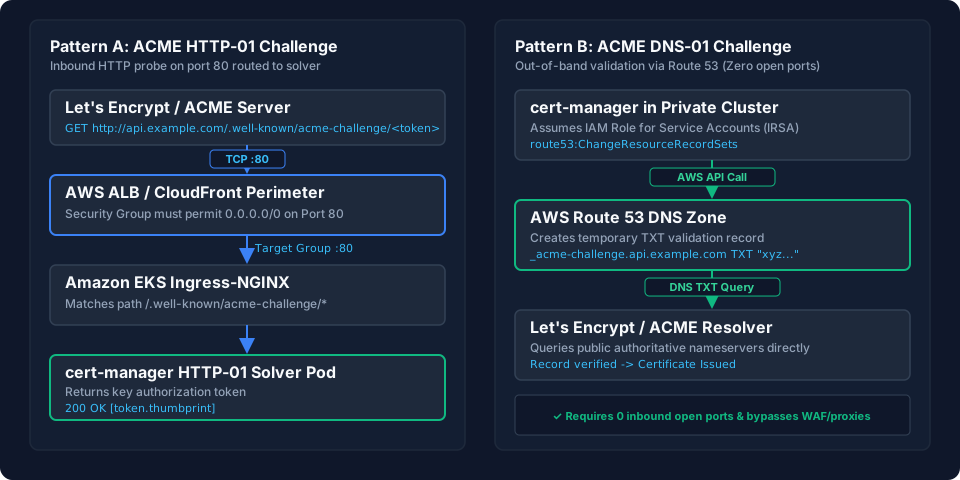
View diagram architecture breakdown
Pattern A (HTTP-01): The ACME server sends an inbound HTTP GET probe to port 80. The request traverses the AWS perimeter (CloudFront / ALB), forwards to Ingress-NGINX on port 80, and terminates at the cert-manager solver pod.
Pattern B (DNS-01): cert-manager in a private cluster assumes an IAM IRSA role, calls the Route 53 API to create a TXT validation record, and Let's Encrypt queries authoritative DNS servers directly with zero inbound open ports.
Scenario 1: Troubleshooting ACME HTTP-01 Renewal Drops
Deployment Pattern: Internet -> (Optional CloudFront) -> AWS ALB -> Amazon EKS Ingress-NGINX with cert-manager HTTP-01 solvers.
Step 0: Identify the Public Ingress Entry Point
Resolve the target hostname and inspect the complete DNS record chain to determine the public ingress layer:
dig +short api.example.com
dig CNAME api.example.com +trace
Diagnostic interpretation:
- If the record chain resolves to a CloudFront domain (
*.cloudfront.net): Inbound requests route through CloudFront first. Follow Step 1 through Step 4. - If the record chain resolves directly to an Application Load Balancer (
*.elb.amazonaws.com) or an EC2 Elastic IP: CloudFront is not in the path. Proceed to Step 1, Step 3, and Step 4 for load balancer and cluster triage. - If the domain uses DNS-01 validation instead: Stop here. Inbound HTTP port 80 routing is not involved in DNS-01 certificate renewals.
Step 1: Check TCP Port 80 Reachability
Test whether TCP port 80 accepts connections from an external network:
curl -Iv --connect-timeout 5 http://api.example.com/Diagnostic evaluation:
- If the output shows
curl: (28) Connection timed outorcurl: (7) Failed to connect: Port 80 is unreachable from the outside network. Inspect the load balancer Security Groups and subnet Network ACLs below. - If the output returns an HTTP status code (
200,301,302,404): TCP port 80 is open. Proceed to Step 2 if using CloudFront, or Step 3 for ALB and WAF inspection.
Inspecting All Attached Security Groups
An ALB can have multiple security groups attached. Retrieve and inspect all associated groups for inbound TCP port 80 rules:
ALB_ARN=$(aws elbv2 describe-load-balancers --names "prod-alb" --query "LoadBalancers[0].LoadBalancerArn" --output text)
SG_IDS=$(aws elbv2 describe-load-balancers --load-balancer-arns "$ALB_ARN" --query "LoadBalancers[0].SecurityGroups" --output text)

aws ec2 describe-security-groups \
  --group-ids $SG_IDS \
  --query "SecurityGroups[*].[GroupId,GroupName,IpPermissions[?IpProtocol=='tcp' && FromPort<=`80` && ToPort>=`80`]]" \
  --output table
If no attached security group permits inbound TCP traffic on port 80 from the required source CIDRs, port 80 is blocked at the security group layer. Identify the security group intended to control public ingress, then add the TCP/80 rule there if no existing attached security group already permits the required traffic:
INGRESS_SG_ID="sg-0123456789abcdef0"

aws ec2 authorize-security-group-ingress \
  --group-id "$INGRESS_SG_ID" \
  --protocol tcp \
  --port 80 \
  --cidr 0.0.0.0/0
Inspecting Subnet Network ACLs
Because Network ACLs are stateless, you must verify both inbound rules for port 80 and outbound rules for ephemeral return traffic (ports 1024-65535):
SUBNET_ID=$(aws elbv2 describe-load-balancers --load-balancer-arns "$ALB_ARN" --query "LoadBalancers[0].AvailabilityZones[0].SubnetId" --output text)

aws ec2 describe-network-acls \
  --filters "Name=association.subnet-id,Values=$SUBNET_ID" \
  --query "NetworkAcls[0].Entries[*].[RuleNumber,RuleAction,Egress,Protocol,PortRange.From,PortRange.To,CidrBlock]" \
  --output table
Evaluation criteria:
- Inbound rules (
Egress: false) must have anALLOWrule covering TCP port 80 evaluated before anyDENYrule. - Outbound rules (
Egress: true) must have anALLOWrule covering ephemeral ports (1024-65535 or all ports) to permit response packets back to the client.
Step 2: Trace the Challenge Path Through CloudFront
Run this check only if Step 0 confirmed that the domain resolves through CloudFront.
ACME validation servers initiate validation on port 80 and follow standard HTTP/HTTPS redirects. A redirect alone does not break validation. The query fails if the redirect chain creates a loop, points to an unreachable or misconfigured host, or fails to deliver the expected token content.
Trace the full challenge path from an external network:
curl -ILv http://api.example.com/.well-known/acme-challenge/test-tokenDiagnostic interpretation:
- If the response returns
HTTP/1.1 301or302redirecting to an endpoint that fails to complete the request or loops infinitely: Inspect the redirect chain to identify the misconfigured forwarding layer. - If the output shows
HTTP/1.1 403 Forbidden: CloudFront, WAF, or an origin policy is blocking the path. Proceed to Step 3. - If the output reaches the origin and returns
HTTP 404: Proceed to Step 4.
Remediation when direct HTTP routing to origin is required:
If you need HTTP-01 challenge traffic to reach the origin over plain HTTP without undergoing edge redirects, configure an ordered Cache Behavior in CloudFront matching path /.well-known/acme-challenge/* set to ViewerProtocolPolicy: allow-all and forward it directly to the origin.
Verification:
curl -Iv http://api.example.com/.well-known/acme-challenge/test-tokenExpected Output: Returns an HTTP response code directly over port 80 without enforcing an edge redirect.
Step 3: Inspect AWS WAF Sampled Requests
Do not add WAF exception rules without confirming that WAF is the component blocking the challenge.
First, list all configured rules and their metric names:
WAF_ARN=$(aws wafv2 list-web-acls --scope REGIONAL --query "WebACLs[?Name=='prod-waf'].ARN" --output text)

aws wafv2 describe-web-acl \
  --arn "$WAF_ARN" \
  --scope REGIONAL \
  --query "WebACL.Rules[*].[Name,VisibilityConfig.MetricName,Priority]" \
  --output table
Identify the suspected terminating rule from the list (for example, a managed rule group or custom restriction) and query sampled requests for that specific rule metric:
# Linux
START_TIME=$(date -u -d '1 hour ago' +%s)
END_TIME=$(date -u +%s)

# macOS (alternative)
# START_TIME=$(date -u -v-1H +%s)
# END_TIME=$(date -u +%s)

TARGET_RULE_METRIC="AWS-AWSManagedRulesCommonRuleSet"

aws wafv2 get-sampled-requests \
  --web-acl-arn "$WAF_ARN" \
  --rule-metric-name "$TARGET_RULE_METRIC" \
  --scope REGIONAL \
  --time-window "StartTime=${START_TIME},EndTime=${END_TIME}" \
  --max-items 100 \
  --query "SampledRequests[?contains(Request.URI, '/.well-known/acme-challenge/')].[Request.ClientIP,Request.URI,Action,TerminatingRuleId]" \
  --output table
Diagnostic evaluation:
- If the output contains rows with
Action: BLOCK: The rule listed underTerminatingRuleIdis intercepting the challenge token. - If the output is empty or shows
Action: ALLOW: WAF is not blocking the challenge path. Move to Step 4.
Remediation:
Identify the TerminatingRuleId. Prefer excluding or scoping that specific managed rule. If a dedicated exception rule is necessary, add a narrow rule matching HTTP GET and HEAD requests for the ACME challenge path:
{
  "Name": "Allow-ACME-HTTP-Get-Head",
  "Priority": 0,
  "Action": { "Allow": {} },
  "VisibilityConfig": {
    "SampledRequestsEnabled": true,
    "CloudWatchMetricsEnabled": true,
    "MetricName": "AllowACMEHttpGetHead"
  },
  "Statement": {
    "AndStatement": {
      "Statements": [
        {
          "ByteMatchStatement": {
            "SearchString": "/.well-known/acme-challenge/",
            "FieldToMatch": { "UriPath": {} },
            "TextTransformations": [{ "Priority": 0, "Type": "NONE" }],
            "PositionalConstraint": "STARTS_WITH"
          }
        },
        {
          "OrStatement": {
            "Statements": [
              {
                "ByteMatchStatement": {
                  "SearchString": "GET",
                  "FieldToMatch": { "Method": {} },
                  "TextTransformations": [{ "Priority": 0, "Type": "NONE" }],
                  "PositionalConstraint": "EXACTLY"
                }
              },
              {
                "ByteMatchStatement": {
                  "SearchString": "HEAD",
                  "FieldToMatch": { "Method": {} },
                  "TextTransformations": [{ "Priority": 0, "Type": "NONE" }],
                  "PositionalConstraint": "EXACTLY"
                }
              }
            ]
          }
        }
      ]
    }
  }
}
Step 4: Triage Kubernetes cert-manager Challenge Resources
If the request returns an HTTP 404 status, inspect the cert-manager challenge state:
CHALLENGE_NAME=$(kubectl get challenge -n production -o jsonpath='{.items[0].metadata.name}')
kubectl describe challenge "$CHALLENGE_NAME" -n production
Diagnostic evaluation:
- If the reason indicates
failed to perform self-check GET request ... status code 404: The challenge request is reaching an HTTP responder, but the expected solver response is not being returned. Inspect the solver Ingress, hostname, path routing, and any upstream CDN or ALB rules.
Inspect the solver resources generated by cert-manager:
kubectl get ingress,svc,pod -n production -l "acme.cert-manager.io/http01-solver=true"Next diagnostic branch:
- If the solver Pod is in
PendingorCrashLoopBackOff: Runkubectl describe pod -l acme.cert-manager.io/http01-solver=true -n productionto inspect resource constraints, node selectors, taints, or security context issues. - If the solver Ingress exists but uses an unrouted Ingress class: Update the
ClusterIssuersolver configuration to match the active Ingress controller class. - If no solver Ingress was created: Inspect cert-manager controller logs:
kubectl logs -n cert-manager -l app=cert-manager --tail=100.
Remediation (when Ingress class mismatch is confirmed):
apiVersion: cert-manager.io/v1
kind: ClusterIssuer
metadata:
  name: letsencrypt-production-http01
spec:
  acme:
    server: https://acme-v02.api.letsencrypt.org/directory
    email: platform-alerts@example.com
    privateKeySecretRef:
      name: letsencrypt-account-key
    solvers:
    - http01:
        ingress:
          class: nginx
          podTemplate:
            spec:
              nodeSelector:
                kubernetes.io/os: linux
Verification:
kubectl cert-manager renew api-example-tls -n production
kubectl get certificate api-example-tls -n production
Expected Output: READY: True.
Scenario 2: Incomplete Certificate Chains (Missing Intermediate CA)
Deployment Pattern: AWS Certificate Manager (ACM) imported certificates, custom Ingress-NGINX TLS secrets, or Envoy Gateway.
1. Symptom
Some browsers and operating systems may recover by fetching a missing intermediate certificate through Authority Information Access (AIA), while non-browser HTTP clients (Python requests, Go services, mobile SDKs, and cURL) fail during the TLS handshake:
curl: (60) SSL certificate problem: unable to get local issuer certificate
x509: certificate signed by unknown authority
2. Inspecting the Wire Certificate Chain
Query the live endpoint with OpenSSL:
openssl s_client -showcerts -servername api.example.com -connect api.example.com:443 </dev/nullDiagnostic evaluation:
If the output only contains certificate level 0 (the leaf) and lacks intermediate certificates required by the client trust store:
Certificate chain
 0 s:CN = api.example.com
   i:C = US, O = Example CA, CN = Example Intermediate R1
Verify return code: 21 (unable to verify the first certificate)
Confirmed cause: The server presents only the leaf certificate. The intermediate certificate required to link the leaf to the trusted root is missing from the bundle configured on the server.
If the output contains the complete chain linking to a recognized root:
Certificate chain
 0 s:CN = api.example.com
   i:C = US, O = Example CA, CN = Example Intermediate R1
 1 s:C = US, O = Example CA, CN = Example Intermediate R1
   i:C = US, O = Example Root Authority, CN = Example Root CA
Verify return code: 0 (ok)
The server bundle is complete. If clients still fail, the issue resides in the client local root trust store, not the server chain.
3. Re-assembling and Applying the Certificate Bundle
For AWS ACM Imported Certificates
Re-import the certificate and supply the intermediate CA bundle in the --certificate-chain parameter:
aws acm import-certificate \
  --certificate fileb://leaf_cert.pem \
  --private-key fileb://privkey.pem \
  --certificate-chain fileb://intermediate_ca.pem \
  --certificate-arn "arn:aws:acm:us-east-1:123456789012:certificate/abc-123-def"
For Kubernetes Ingress TLS Secrets
Concatenate the leaf certificate followed by the intermediate CA into a single file and apply the secret:
cat leaf_cert.pem intermediate_ca.pem > /tmp/fullchain.pem

kubectl create secret tls api-example-tls \
  --cert=/tmp/fullchain.pem \
  --key=privkey.pem \
  -n production \
  --dry-run=client -o yaml | kubectl apply -f -
Verification:
openssl s_client -verify_return_error -servername api.example.com -connect api.example.com:443 </dev/nullExpected Output: Verify return code: 0 (ok).
Scenario 3: Multi-Tenant SNI Routing and Default Certificate Fallback
Deployment Pattern: Multi-tenant AWS ALB or Kubernetes Ingress Controller serving multiple hostnames on a single IP address.
1. Symptom
Accessing https://checkout.example.com returns a certificate common name mismatch, serving internal.default.net or Kubernetes Ingress Controller Fake Certificate.
2. Testing SNI Selection with OpenSSL
Compare the certificate returned when SNI is present vs omitted:
# Query A: Connect without SNI (returns listener default certificate)
openssl s_client -connect api.example.com:443 -brief </dev/null

# Query B: Connect with explicit SNI for the virtual host
openssl s_client -servername checkout.example.com -connect api.example.com:443 -brief </dev/null
Diagnostic evaluation:
- If Query B returns the default certificate (
CN = internal.default.net) instead of the certificate matchingcheckout.example.com: The load balancer has not mapped the requested hostname to a matching certificate in its SNI store.
3. Inspecting and Correcting SNI Bindings
For AWS ALB Listeners
Inspect the certificates bound to the HTTPS listener:
LISTENER_ARN=$(aws elbv2 describe-listeners --load-balancer-arn "$ALB_ARN" --query "Listeners[?Port==`443`].ListenerArn" --output text)

aws elbv2 describe-listener-certificates \
  --listener-arn "$LISTENER_ARN" \
  --query "Certificates[*].[CertificateArn,IsDefault]" \
  --output table
If the certificate for checkout.example.com is missing from the list, the ALB falls back to its default certificate. Attach the certificate:
CERT_ARN=$(aws acm list-certificates --query "CertificateSummaryList[?DomainName=='checkout.example.com'].CertificateArn" --output text)

aws elbv2 add-listener-certificates \
  --listener-arn "$LISTENER_ARN" \
  --certificates CertificateArn="$CERT_ARN"
For Kubernetes Ingress Controllers
Ensure the Ingress resource specifies the hostname under spec.tls and references a Secret existing in the same namespace:
apiVersion: networking.k8s.io/v1
kind: Ingress
metadata:
  name: checkout-ingress
  namespace: checkout-app
spec:
  ingressClassName: nginx
  tls:
  - hosts:
    - checkout.example.com
    secretName: checkout-tls-secret
  rules:
  - host: checkout.example.com
    http:
      paths:
      - path: /
        pathType: Prefix
        backend:
          service:
            name: checkout-service
            port:
              number: 80
Verify that the secret exists in that namespace:
kubectl get secret checkout-tls-secret -n checkout-appVerification:
openssl s_client -servername checkout.example.com -connect api.example.com:443 </dev/null 2>/dev/null \
  | openssl x509 -noout -subject -ext subjectAltName
Expected Output:
subject=CN = checkout.example.com
X509v3 Subject Alternative Name:
    DNS:checkout.example.com
Scenario 4: Resolving TLS Offloading Redirect Loops (ERR_TOO_MANY_REDIRECTS)
Deployment Pattern: AWS ALB terminating TLS on port 443 and forwarding plaintext HTTP over port 80 to backend NGINX or container workloads.
1. Symptom
Browsers report ERR_TOO_MANY_REDIRECTS. Running cURL shows repeated 301 Moved Permanently responses:
curl -IL https://api.example.com/HTTP/2 301
location: https://api.example.com/
HTTP/2 301
location: https://api.example.com/
curl: (47) Maximum (50) redirects followed2. Testing Backend Behavior Directly
Testing against the public hostname checks the entire proxy chain rather than isolating the backend. Port-forward directly to the backend service or test the target container private IP:
kubectl port-forward service/api-service 8080:80 -n productionIn a separate terminal, test behavior with and without the forwarded protocol header:
# Test 1: Plain HTTP request without forwarded header
curl -I http://127.0.0.1:8080/

# Test 2: Plain HTTP request with X-Forwarded-Proto header
curl -I -H "X-Forwarded-Proto: https" http://127.0.0.1:8080/
Diagnostic evaluation:
- If Test 1 returns
301and Test 2 returns200: The backend application correctly honorsX-Forwarded-Proto. The redirect loop occurs because the upstream proxy is not sending or is stripping the header. - If Test 2 still returns
301 Location: https://...: Confirmed cause. The backend application ignoresX-Forwarded-Protoand issues an unconditional redirect based on its local plaintext socket ($scheme = http).
3. Configuring NGINX for Offloaded TLS
Only trust X-Forwarded-Proto when direct network access to the backend is restricted to trusted proxies or the header is sanitized and controlled by the upstream load balancer.
Update the NGINX configuration to evaluate $http_x_forwarded_proto before triggering redirects:
# /etc/nginx/conf.d/default.conf

map $http_x_forwarded_proto $redirect_to_https {
    default "1";
    "https" "0";
}

server {
    listen 80;
    server_name api.example.com;

    # Redirect only when the client connection to the ALB was not HTTPS
    if ($redirect_to_https = "1") {
        return 301 https://$host$request_uri;
    }

    location / {
        proxy_pass http://127.0.0.1:8080;
        proxy_set_header Host $host;
        proxy_set_header X-Forwarded-For $proxy_add_x_forwarded_for;
        proxy_set_header X-Forwarded-Proto $http_x_forwarded_proto;
    }
}
If your architecture uses end-to-end TLS where backend pods terminate encryption directly, configure the AWS ALB Target Group protocol as HTTPS on port 443 or 8443.
Verification:
curl -IL https://api.example.com/Expected Output:
HTTP/2 200
server: nginx
content-type: text/html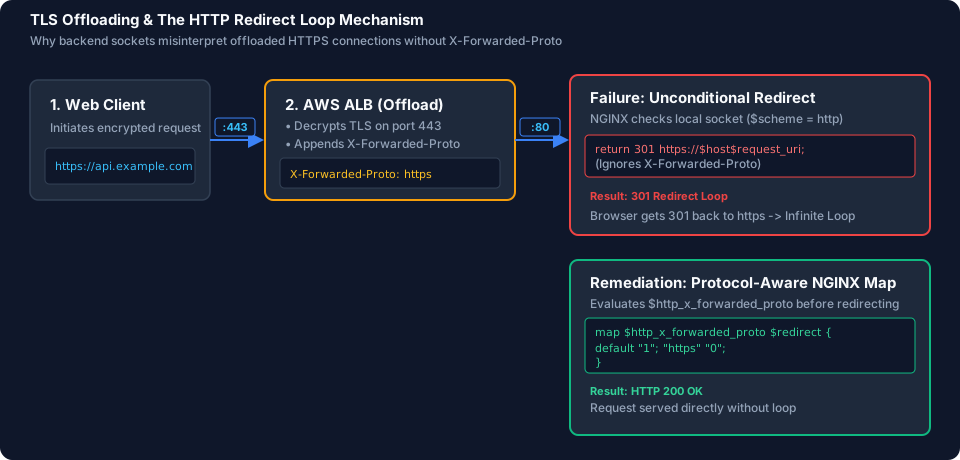
View redirect loop mechanism breakdown
1. Web client initiates an encrypted HTTPS request to the ALB on port 443.
2. The ALB decrypts TLS, appends the header X-Forwarded-Proto: https, and forwards plaintext HTTP to the backend on port 80.
3. Failure mode: Backend NGINX checks local socket scheme (http) and returns an unconditional 301 redirect back to HTTPS, triggering an infinite redirect loop.
4. Resolved mode: NGINX evaluates $http_x_forwarded_proto using a map block, recognizes the upstream HTTPS connection, and serves the response with HTTP 200 OK.
Scenario 5: Resolving Protocol Mismatches on Port 443 (ERR_SSL_PROTOCOL_ERROR)
Deployment Pattern: AWS Network Load Balancer (NLB) with Layer 4 TCP passthrough routing to Kubernetes Ingress NodePorts or Pod IPs.
1. Diagnosing Handshake Failures on Port 443
Run an explicit TLS handshake test against the endpoint:
openssl s_client -connect api.example.com:443 -servername api.example.com </dev/nullObserved Error:
140735205582720:error:140770FC:SSL routines:SSL23_GET_SERVER_HELLO:unknown protocol:s23_clnt.c:794:Diagnostic evaluation:
An unknown protocol or immediate handshake drop on port 443 indicates that the backend service responding to the TCP connection did not complete the TLS handshake. This failure typically occurs when a Layer 4 listener forwards traffic to a plaintext port instead of a TLS listener.
2. Inspecting NodePorts and NLB Target Group Configuration
Check the NodePorts assigned to the Ingress controller service:
kubectl get svc -n ingress-nginx ingress-nginx-controller \
  -o jsonpath='{range .spec.ports[*]}{.name}{": port="}{.port}{" nodePort="}{.nodePort}{"\n"}{end}'
Output:
http: port=80 nodePort=30080
https: port=443 nodePort=30443
Check the Target Group mapped to the NLB port 443 listener:
NLB_ARN=$(aws elbv2 describe-load-balancers --names "prod-nlb" --query "LoadBalancers[0].LoadBalancerArn" --output text)
TG_ARN=$(aws elbv2 describe-listeners --load-balancer-arn "$NLB_ARN" --query "Listeners[?Port==`443`].DefaultActions[0].TargetGroupArn" --output text)

aws elbv2 describe-target-groups \
  --target-group-arns "$TG_ARN" \
  --query "TargetGroups[0].[TargetGroupName,Port,Protocol,TargetType]" \
  --output table
Output:
--------------------------------------------------------------
|                    DescribeTargetGroups                    |
+------------------------+--------+-------+------------------+
|  k8s-ingress-https-tg  |  30080 |  TCP  |  instance        |
+------------------------+--------+-------+------------------+
Confirmed cause: The NLB port 443 listener routes traffic to Target Group k8s-ingress-https-tg on port 30080 (the plaintext HTTP NodePort) instead of 30443 (the HTTPS NodePort).
3. Correcting the Port Mapping
Select the remediation that matches your target architecture:
Architecture Choice A: Raw TCP Passthrough to Ingress Controller (Instance Mode)
If Ingress-NGINX terminates TLS inside the cluster, create a Target Group pointing to NodePort 30443, register the worker node targets, and update the NLB listener:
VPC_ID=$(aws elbv2 describe-load-balancers --load-balancer-arns "$NLB_ARN" --query "LoadBalancers[0].VpcId" --output text)

NEW_TG_ARN=$(aws elbv2 create-target-group \
  --name "k8s-ingress-tls-30443" \
  --protocol TCP \
  --port 30443 \
  --vpc-id "$VPC_ID" \
  --target-type instance \
  --query "TargetGroups[0].TargetGroupArn" --output text)

# Retrieve target instances from the existing target group to register the same node set
EXISTING_TG_ARN=$(aws elbv2 describe-listeners --load-balancer-arn "$NLB_ARN" --query "Listeners[?Port==`443`].DefaultActions[0].TargetGroupArn" --output text)
TARGET_IDS=$(aws elbv2 describe-target-health --target-group-arn "$EXISTING_TG_ARN" --query "TargetHealthDescriptions[*].Target.Id" --output text)

for instance in $TARGET_IDS; do
  aws elbv2 register-targets --target-group-arn "$NEW_TG_ARN" --targets Id="$instance",Port=30443
done

# Point the NLB port 443 listener to the new target group
LISTENER_ARN=$(aws elbv2 describe-listeners --load-balancer-arn "$NLB_ARN" --query "Listeners[?Port==`443`].ListenerArn" --output text)

aws elbv2 modify-listener \
  --listener-arn "$LISTENER_ARN" \
  --default-actions Type=forward,TargetGroupArn="$NEW_TG_ARN"
If your cluster uses the AWS Load Balancer Controller, manage this declaratively via Kubernetes Service annotations to avoid manual target synchronization:
apiVersion: v1
kind: Service
metadata:
  name: ingress-nginx-controller
  namespace: ingress-nginx
  annotations:
    service.beta.kubernetes.io/aws-load-balancer-type: "external"
    service.beta.kubernetes.io/aws-load-balancer-nlb-target-type: "instance"
    service.beta.kubernetes.io/aws-load-balancer-scheme: "internet-facing"
spec:
  type: LoadBalancer
  ports:
  - name: http
    port: 80
    targetPort: 80
  - name: https
    port: 443
    targetPort: 443
Architecture Choice B: TLS Termination at the Network Load Balancer
If you want the NLB to terminate TLS directly, change the NLB listener protocol from TCP to TLS, attach an ACM certificate, and forward to a backend Target Group configured for TCP on the backend port.
Architecture Choice C: Layer 7 Routing with an Application Load Balancer
If your workloads require Layer 7 features (such as path-based routing or header inspection), deploy an AWS ALB with an HTTPS listener and attach an ACM certificate, forwarding to the backend HTTP port appropriate to the target type, for example container/pod port 80 or a Kubernetes NodePort such as 30080.
Verification:
curl -Iv https://api.example.com/Expected Output:
* Connected to api.example.com (198.51.100.24) port 443 (#0)
* ALPN, offering h2
* ALPN, offering http/1.1
* TLSv1.3 (IN), TLS handshake, [server certificate verified]
* Server certificate:
*  subject: CN=api.example.com
*  issuer: C=US; O=Let's Encrypt; CN=R3
*  SSL certificate verify ok.
< HTTP/2 200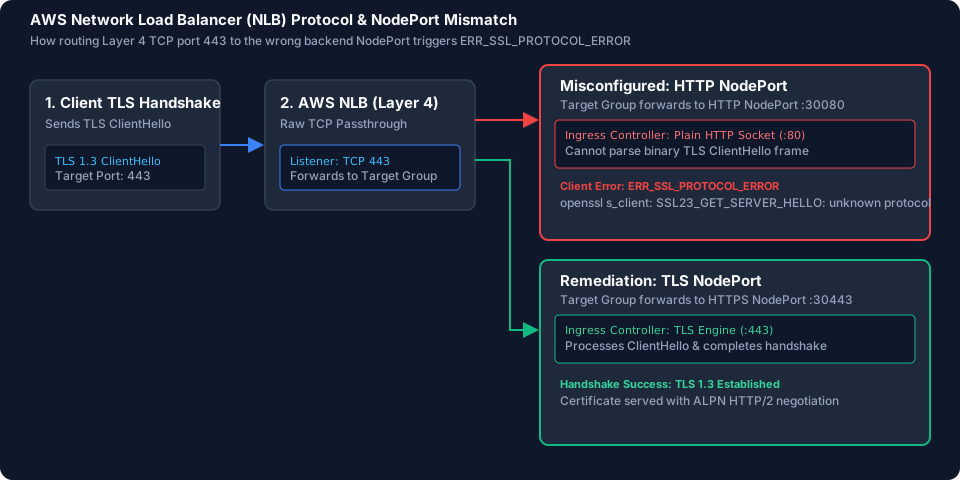
View NLB protocol mapping breakdown
1. Client initiates a TLS 1.3 ClientHello targeted to port 443.
2. The AWS NLB performs raw Layer 4 TCP passthrough without decrypting traffic.
3. Failure state: Target Group forwards port 443 to HTTP NodePort 30080, hitting the plaintext HTTP socket on Ingress-NGINX and resulting in an ERR_SSL_PROTOCOL_ERROR handshake drop.
4. Remediated state: Target Group forwards port 443 to HTTPS NodePort 30443, reaching the cluster TLS engine and successfully negotiating TLS 1.3.
Production Prevention: Decoupling Certificates with DNS Validation
The troubleshooting scenarios above address HTTP-01 challenges, which depend on inbound port 80 reachability and proxy routing. If you have administrative control over the certificate architecture, switching to DNS-01 validation eliminates port 80 and HTTP routing dependencies for certificate validation.
1. Terraform / OpenTofu: AWS ACM with Route 53 DNS Validation
resource "aws_acm_certificate" "app_cert" {
  domain_name       = "api.example.com"
  validation_method = "DNS"

  subject_alternative_names = [
    "*.api.example.com"
  ]

  lifecycle {
    create_before_destroy = true
  }
}

resource "aws_route53_record" "cert_validation" {
  for_each = {
    for dvo in aws_acm_certificate.app_cert.domain_validation_options : dvo.domain_name => {
      name   = dvo.resource_record_name
      record = dvo.resource_record_value
      type   = dvo.resource_record_type
    }
  }

  allow_overwrite = true
  name            = each.value.name
  records         = [each.value.record]
  ttl             = 60
  type            = each.value.type
  zone_id         = data.aws_route53_zone.primary.zone_id
}

resource "aws_acm_certificate_validation" "app_cert_validation" {
  certificate_arn         = aws_acm_certificate.app_cert.arn
  validation_record_fqdns = [for record in aws_route53_record.cert_validation : record.fqdn]
}

# ALB HTTP:80 Listener -> Redirect to HTTPS:443
resource "aws_lb_listener" "http_80" {
  load_balancer_arn = aws_lb.main.arn
  port              = "80"
  protocol          = "HTTP"

  default_action {
    type = "redirect"

    redirect {
      port        = "443"
      protocol    = "HTTPS"
      status_code = "HTTP_301"
    }
  }
}

# ALB HTTPS:443 Listener
resource "aws_lb_listener" "https_443" {
  load_balancer_arn = aws_lb.main.arn
  port              = "443"
  protocol          = "HTTPS"
  ssl_policy        = "ELBSecurityPolicy-TLS13-1-2-2021-06"
  certificate_arn   = aws_acm_certificate_validation.app_cert_validation.certificate_arn

  default_action {
    type             = "forward"
    target_group_arn = aws_lb_target_group.app_backend.arn
  }
}
2. Kubernetes cert-manager: Route 53 DNS-01 Issuer (IRSA)
For workloads using cert-manager that cannot expose port 80, configure a DNS-01 ClusterIssuer backed by an IAM Role for Service Accounts (IRSA):
apiVersion: cert-manager.io/v1
kind: ClusterIssuer
metadata:
  name: letsencrypt-route53
spec:
  acme:
    server: https://acme-v02.api.letsencrypt.org/directory
    email: alerts@example.com
    privateKeySecretRef:
      name: letsencrypt-account-key
    solvers:
    - dns01:
        route53:
          region: us-east-1
          hostedZoneID: Z1234567890ABCDEF
3. Proactive Monitoring with Prometheus Blackbox Exporter
The opening incident profile demonstrated that silent background renewal failures remain undetected until the certificate reaches its hard expiration timestamp. Add proactive monitoring on public endpoints to alert on impending certificate expiration and TLS handshake failures:
# blackbox.yml
modules:
  http_ssl_check:
    prober: http
    timeout: 5s
    http:
      valid_http_versions: ["HTTP/1.1", "HTTP/2"]
      valid_status_codes: [200, 301, 302]
      method: GET
      fail_if_ssl: false
      fail_if_not_ssl: true
      tls_config:
        insecure_skip_verify: false
# prometheus-alerts.yml
groups:
- name: ssl_production_alerts
rules:
- alert: SSLCertificateExpiringSoon
expr: (probe_ssl_earliest_cert_expiry - time()) / 86400 < 14
for: 2h
labels:
severity: warning
team: platform-core
annotations:
summary: "SSL Certificate on {{ $labels.instance }} expiring in under 14 days"
description: "The earliest-expiring monitored certificate on endpoint {{ $labels.instance }} expires in {{ $value | printf \"%.1f\" }} days. Verify renewal automation."
- alert: SSLHandshakeFailed
expr: probe_http_ssl == 0
for: 3m
labels:
severity: critical
team: platform-core
annotations:
summary: "TLS Handshake Failed for {{ $labels.instance }}"
description: "Probe failed to complete TLS handshake on port 443."Operational Ingress Triage Matrix
| Observed Symptom | Verification Check | Interpretation | Next action after confirmation |
|---|---|---|---|
| ACME Renewal Timeout | curl -Iv --connect-timeout 5 http://<HOST>/ | Port 80 connection timed out | Inspect all ALB Security Groups and Subnet NACLs; authorize inbound TCP port 80. |
| ACME Path Returns 403 | aws wafv2 get-sampled-requests | Sampled requests show Action: BLOCK | Add narrow WAF allow rule for GET and HEAD requests on /.well-known/acme-challenge/*. |
| ACME Path Returns 404 | kubectl describe challenge <NAME> | Solver ingress or pod missing/unrouted | Fix Ingress class on ClusterIssuer or resolve solver pod scheduling constraints. |
| Certificate Chain Error | openssl s_client -showcerts -connect <HOST>:443 | Output shows only certificate level 0 | Re-upload bundle to ACM or Kubernetes Secret including leaf and intermediate CA. |
| SNI Common Name Mismatch | openssl s_client -servername <HOST> -connect <HOST>:443 | Returns listener default certificate | Attach certificate ARN to ALB listener SNI list or align Ingress Secret namespace. |
| Redirect Loop on HTTPS | curl -I -H "X-Forwarded-Proto: https" <BACKEND> | Backend returns 301 despite header | Update NGINX to evaluate $http_x_forwarded_proto before executing redirects. |
| Protocol Error on 443 | aws elbv2 describe-target-groups | Target Group maps port 443 to HTTP NodePort | Remap Target Group to HTTPS NodePort (30443) or Pod TLS port (443). |
From the team at
We build digital products and explore the modern web standards behind them.