On this page
OPFS: High-Performance Local File Storage for WASM, SQLite & AI in the Browser
A detailed technical guide to the Origin Private File System (OPFS). Explore synchronous worker APIs, SQLite WASM integration, and how OPFS bypasses IndexedDB serialization overhead.
Reference Card
- Spec
- File System Standard (WHATWG)
- Browser support
- Chrome 108+, Safari 15.2+/16.4+, Firefox 111+
- Primary use case
- High-performance local I/O for SQLite, WASM, and large binary files
- Worker requirement
- Synchronous API (
FileSystemSyncAccessHandle) requires Web Worker - Security requirement
- Requires Secure Context (HTTPS)
- Persistence
- "Best effort" by default; requires
navigator.storage.persist()for durability - Last verified
- August 2026 against WHATWG Standard and modern browser internals.
Key takeaways
- ✓ Avoids IndexedDB's structured cloning and transactional object storage model.
- ✓ Provides byte-oriented synchronous file I/O that minimizes serialization overhead via
FileSystemSyncAccessHandle. - ✓ Increasingly used by SQLite WASM, FFmpeg.wasm, and client-side ML models.
- ✓ Exists entirely in a private sandbox; safely separated from the OS file manager.
- ✓ The high-performance synchronous API is isolated to Dedicated Workers, protecting the main thread from UI jank.
At a glance
Use OPFS if: ✓ SQLite WASM ✓ AI models (LLM weights, embeddings) ✓ Video editing (FFmpeg.wasm) ✓ CAD and complex graphic software ✓ Game assets ✓ Massive binary files
Don’t use OPFS if: ✗ User documents they expect to open in Word/Explorer ✗ Small structured JSON objects ✗ Cross-device syncing
Short answer: The Origin Private File System (OPFS) is a highly optimized, origin-sandboxed virtual file system exposed to the browser. Unlike IndexedDB, which serializes data through structured cloning, OPFS allows WebAssembly and Web Workers to perform raw, synchronous operations directly to the browser-managed storage backend. It is the foundational technology that makes full-blown desktop applications (like SQLite and video editors) viable on the web.
Who this is for: Platform developers building desktop-grade web applications, WebAssembly developers, AI/ML developers porting models to the browser, and anyone pushing the boundaries of client-side performance.
1. The Storage Architecture
To understand OPFS, we must place it in the context of the browser’s storage manager.
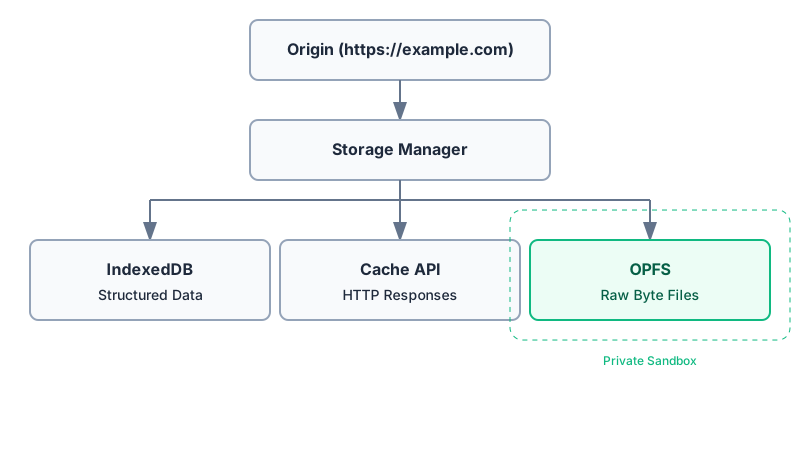
Security and Sandboxing
Security dictates that web pages cannot arbitrarily read a user’s hard drive. OPFS satisfies this by enforcing a strict sandbox:
- Same-origin policy:
https://app.example.comcannot access the OPFS ofhttps://other.example.com. - Inaccessible from OS: Not intended to be user-accessible through the operating system’s file manager (like Finder or Explorer). Implementations typically store the data inside browser-managed profile directories.
- Private browsing: OPFS is available in incognito/private windows, but the entire virtual file system is destroyed the moment the private session ends. Note that availability and quota limits in private mode differ significantly across browser engines (Firefox and Safari are significantly stricter).
- Secure Contexts: OPFS is only available in Secure Contexts (HTTPS and
localhost). - Cryptographic Isolation: Note that OPFS is origin-scoped, not cryptographically isolated at the application level. While iOS/Android encrypt the disk at rest, another process attacking the browser profile could extract OPFS data. For truly sensitive data, apply application-level encryption (e.g., Web Crypto API) before writing bytes to OPFS.
2. Browser Support
While OPFS is broadly supported, the asynchronous and synchronous APIs stabilized at different times.
| Feature | Chrome/Edge | Safari | Firefox |
|---|---|---|---|
| Async API (Main Thread) | 108+ | 15.2+ | 111+ |
| Sync API (Web Worker) | 108+ | 16.4+ | 111+ |
Note: Safari (WebKit) and Firefox (Gecko) have historically applied stricter private browsing restrictions and quota heuristics than Chrome (Blink). iOS Safari, in particular, will aggressively evict OPFS data under storage pressure if persistence is not granted.
See the MDN compatibility tables for up-to-date and granular browser support data.
3. The Performance Difference: Why Not IndexedDB?
For over a decade, IndexedDB was the only viable client-side storage mechanism for large data. However, IndexedDB suffers from fundamental architectural bottlenecks that make it unsuitable for high-frequency binary I/O (like running a database engine or video encoder in the browser).
The IndexedDB Bottleneck
Every read/write in IndexedDB requires data to be serialized (copied) crossing boundaries, and executes asynchronously through the browser’s event loop.
The OPFS Advantage
OPFS avoids IndexedDB’s structured cloning and transactional object storage model. By using FileSystemSyncAccessHandle, it grants a Web Worker byte-oriented synchronous file I/O that minimizes serialization overhead.
WASM Note: Some multithreaded WebAssembly applications that use OPFS also rely on SharedArrayBuffer for threading. To use SharedArrayBuffer, your server must emit cross-origin isolation headers (Cross-Origin-Opener-Policy: same-origin and Cross-Origin-Embedder-Policy: require-corp). You can verify this at runtime by checking if (crossOriginIsolated) { ... }.
4. Async vs Sync API: The Web Worker Requirement
The WHATWG File System Standard restricts FileSystemSyncAccessHandle to Dedicated Workers to prevent UI jank on the Main Thread. Attempting to create one on the main thread fails.
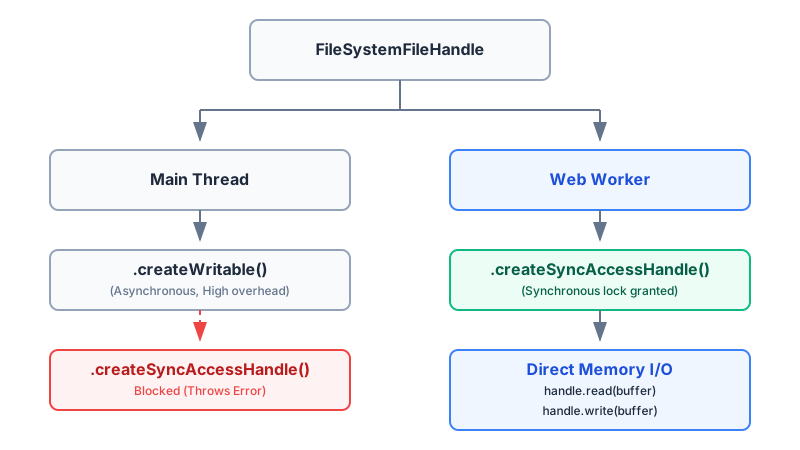
| Feature | Async API | Sync API |
|---|---|---|
| Context | Main thread, Workers, Service Workers | Dedicated Web Worker only |
| Mechanism | FileSystemWritableFileStream | FileSystemSyncAccessHandle |
| Random access | Limited | High performance byte-level access |
| Performance | Good for bulk downloads | Excellent for high-frequency I/O (Databases, WASM) |
Using OPFS on the Main Thread (Asynchronous)
If you are just saving a large file downloaded from a server, or managing directories, the Main Thread async API is sufficient.
// 1. Get the OPFS root directory
const root = await navigator.storage.getDirectory();

// 2. Directory Operations: Create a nested folder
const modelsDir = await root.getDirectoryHandle('models', { create: true });

// 3. Create or open a file inside the new directory
const fileHandle = await modelsDir.getFileHandle('weights.bin', { create: true });

// 4. Create a Writable stream (Asynchronous)
const writable = await fileHandle.createWritable();
await writable.write('Async OPFS!');
await writable.close();

// 5. Directory Iteration
for await (const [name, handle] of modelsDir) {
  console.log(name, handle.kind); // "weights.bin", "file"
}

// 6. Cleanup / Deletion
await modelsDir.removeEntry('weights.bin');
Note: It’s also possible to extract snapshot copies of files using await fileHandle.getFile(), which returns a standard File object.
Using OPFS in a Web Worker (Synchronous)
For SQLite, video encoding, or AI models, you must use a Dedicated Web Worker to access the SyncAccessHandle.
// Inside worker.js
async function writeFast() {
  const root = await navigator.storage.getDirectory();
  const fileHandle = await root.getFileHandle('data.bin', { create: true });

  // 1. Get the synchronous lock (mode defaults to "readwrite")
  // Note: createSyncAccessHandle() is asynchronous, but the methods on the returned handle are synchronous.
  const syncHandle = await fileHandle.createSyncAccessHandle();

  // 2. Create a buffer
  const buffer = new TextEncoder().encode('High performance binary data');

  // 3. The Full API Surface:
  syncHandle.write(buffer);            // Write bytes
  syncHandle.flush();                  // Requests that buffered writes be committed to the storage backend

  const size = syncHandle.getSize();   // Get file size in bytes
  syncHandle.truncate(size / 2);       // Shrink file

  const readBuffer = new Uint8Array(4);
  syncHandle.read(readBuffer, { at: 0 }); // Read specific bytes

  // 4. Release the lock
  syncHandle.close();
}
Sync Handle API Surface
| Method | Description |
|---|---|
read() | Reads content into a buffer at a specified byte offset. |
write() | Writes buffer content to the file at a specified byte offset. |
flush() | Requests that buffered writes be committed to the storage backend. |
truncate() | Resizes the file to the specified number of bytes. |
getSize() | Returns the size of the file in bytes. |
close() | Closes the handle and releases the lock. |
5. Lock Management and Lifecycle
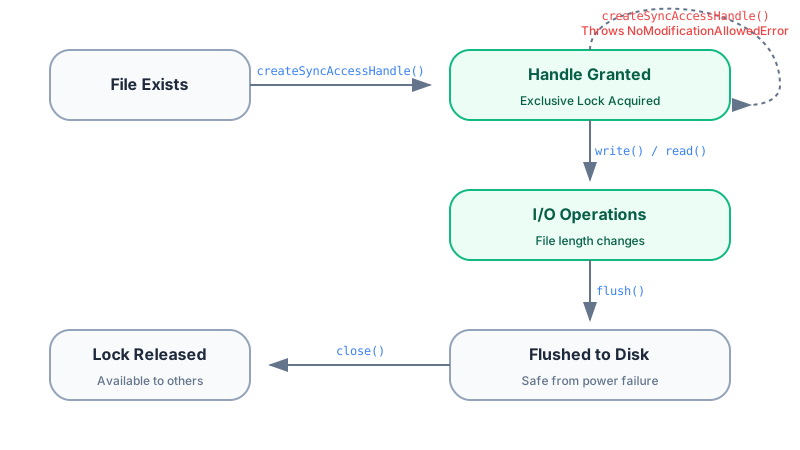
By default, opening a SyncAccessHandle in readwrite mode acquires an exclusive lock. While this lock is active, no other process, thread, or worker can read or write to that file.
| Operation | Purpose |
|---|---|
| create | Opens the SyncAccessHandle and acquires the lock based on the mode. |
| write | Writes bytes synchronously directly to the browser storage backend. |
| flush | Requests that buffered writes be committed to the storage backend. |
| close | Releases the lock, allowing other workers or the main thread to access it. |
| reopen | Can only be performed after a successful close(). |
| delete | Uses removeEntry() on the parent FileSystemDirectoryHandle. Fails if locked. |
Modern browsers support mode configuration during creation:
createSyncAccessHandle({ mode: "readwrite" }): Default. Exclusive lock. Attempting to open a second handle in this mode while the first is open will throw aNoModificationAllowedError.createSyncAccessHandle({ mode: "read-only" }): Shared lock. Multiple workers can hold read-only handles simultaneously (await fileHandle.createSyncAccessHandle({ mode: "read-only" })).createSyncAccessHandle({ mode: "readwrite-unsafe" }): Advanced. Multiple handles can write concurrently. The application must orchestrate locking (viaAtomicsor Web Locks API) to prevent data corruption.
6. Real-World Architecture: SQLite WASM
The most famous success story of OPFS is the official SQLite WASM build. SQLite relies on POSIX C-APIs (open(), read(), write(), fsync()).
To make this work in the browser, SQLite uses its own WebAssembly Virtual File System (VFS) layer. This VFS sits between the core SQLite database engine and the browser, translating C-level POSIX file operations directly into OPFS FileSystemSyncAccessHandle methods.
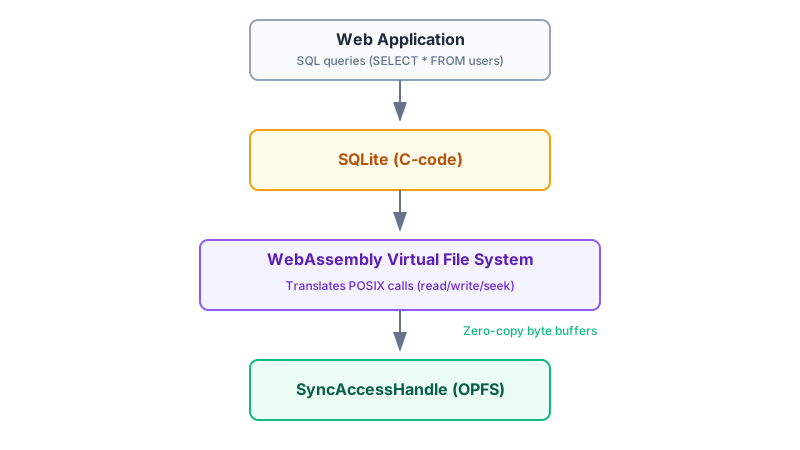
The result is a full relational database running entirely in the browser, capable of handling gigabytes of data and executing complex SQL queries with high performance for many browser-based workloads.
7. Real-World Architecture: AI Models and FFmpeg
AI/ML (ONNX, GGUF, LLM Weights)
Client-side AI models (like ONNX Runtime Web or Transformers.js) require downloading large tensor weight files (hundreds of megabytes to gigabytes). By storing these in OPFS, the WebAssembly inference engine avoids much of the serialization and transactional overhead associated with IndexedDB, streaming weights directly into memory (or mapping them if memory allows).
Video Editing and Design
FFmpeg expects a native file system to read input frames and write output MP4s. OPFS provides the perfect target for FFmpeg.wasm’s virtual disk. Similar solid local storage patterns are utilized by complex browser-based applications like full-fledged design tools and code editors to manage massive assets.
8. Quotas, Eviction, and Persistence
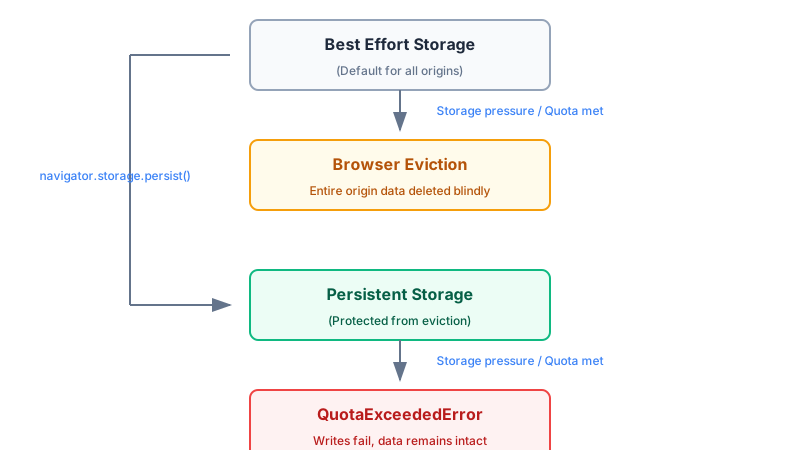
By default, OPFS data is treated as “Best Effort” storage. If the user’s hard drive gets full, the browser may evict an origin’s best-effort storage according to its storage management policies. Safari on iOS is notoriously aggressive here, clearing best-effort OPFS data if the OS experiences storage pressure.
Requesting Persistence
If you are building an application where data loss is unacceptable (like an offline code editor), you must ask the browser for persistent storage. You can check the current state using navigator.storage.persisted(). Note that navigator.storage.persist() must be called from the main thread (window context), not from within a Web Worker:
if (navigator.storage && navigator.storage.persist) {
  const isPersistent = await navigator.storage.persist();
  if (isPersistent) {
    console.log("Storage is far less likely to be evicted.");
  }
}
Handling QuotaExceededError
When writing to OPFS, if the disk is physically full or the browser’s origin quota is met, the write() operation will throw a QuotaExceededError. Use navigator.storage.estimate() to proactively check available space before attempting massive downloads:
const estimate = await navigator.storage.estimate();
const availableMB = (estimate.quota - estimate.usage) / (1024 * 1024);
console.log(`Available quota: ${availableMB.toFixed(2)} MB`);
9. OPFS vs File System Access API
It’s easy to confuse the Origin Private File System with the File System Access API.
- OPFS (
navigator.storage.getDirectory()): A private, hidden sandbox. You do not need to prompt the user for permission to read/write here (beyond standard quota limits). The user cannot see these files in their OS file manager. - File System Access API (
window.showOpenFilePicker()): Prompts the user to select an actual file or folder on their hard drive (e.g.,C:\Users\John\Desktop\project). The web app must ask for explicit permission to read or write to these files.
10. Migration and Transfer Strategy
Exporting OPFS to the User’s OS
Since OPFS files are hidden in a sandbox, users cannot double-click them. To let a user save an OPFS file to their Desktop, you must pipe the OPFS read stream into a File System Access API write stream:
// 1. Get user's OS file location via standard save prompt
// Note: showSaveFilePicker() is itself not supported in every browser.
const osFileHandle = await window.showSaveFilePicker({ suggestedName: 'export.sqlite' });
const osWritable = await osFileHandle.createWritable();

// 2. Open OPFS file
const opfsRoot = await navigator.storage.getDirectory();
const opfsFile = await opfsRoot.getFileHandle('internal.sqlite');
const opfsFileObj = await opfsFile.getFile();

// 3. Stream data from sandbox out to the user's Desktop
await opfsFileObj.stream().pipeTo(osWritable);
Should You Migrate from IndexedDB?
Migrate if: You are storing files larger than 10MB (video, audio) or experiencing Main Thread jank due to massive IndexedDB transactions.
Don’t migrate if:
- You need structured database indexes.
- You need transactional object storage.
- You need SQL-like queries (without running SQLite over OPFS).
- You need automatic cross-tab synchronization.
11. Troubleshooting
| Error | Cause |
|---|---|
QuotaExceededError | The disk is full or the browser’s origin quota has been reached. |
NoModificationAllowedError | You failed to close() an exclusive SyncAccessHandle and tried to open it again. |
NotAllowedError | The browser denied access to the file system (often due to permissions or insecure contexts). |
TypeError | Attempted to use the synchronous API on the main thread instead of a Web Worker. |
InvalidStateError | Handle already closed |
- Safari iOS Aggressive Eviction: If your users report missing data on iOS, it is almost certainly quota eviction. You must request persistence.
- Persistence Denied:
navigator.storage.persist()returnedfalse. This is normal. To increase chances of persistence, prompt the user to “Install App” (PWA) or interact with the page before making the request.
12. OPFS API Reference
| Interface | Purpose |
|---|---|
navigator.storage.getDirectory() | Returns the root FileSystemDirectoryHandle for the origin’s OPFS. |
FileSystemDirectoryHandle | Represents a directory; used to create/iterate/remove files and folders. |
FileSystemFileHandle | Represents a file; used to get File objects or create streams/handles. |
FileSystemWritableFileStream | Used on the main thread for asynchronous writing. |
FileSystemSyncAccessHandle | Used in Web Workers for highly performant synchronous byte-oriented I/O. |
13. Further Reading and References
- WHATWG File System Standard - The definitive technical specification for OPFS and
SyncAccessHandle. - SQLite WASM Documentation - Deep dive into how SQLite leverages OPFS for its VFS layer.
- MDN Web Docs: Origin Private File System - API reference and compatibility charts.
- Chrome Developers: Storage Quotas - Understanding how Chromium calculates storage limits and eviction.
- Storage Standard - WHATWG specification for the StorageManager API.
- MDN Web Docs: StorageManager API - Documentation for quotas and persistence.
14. Browser implementation notes
It is important to remember that browsers implement OPFS differently under the hood:
- Chromium implements OPFS on top of its own internal storage subsystem (and SQLite in some parts).
- Different browser engines have entirely different internal file system architectures.
- Applications should depend strictly on the standard API contract rather than making assumptions about these implementation details, as they are subject to change.
15. Frequently Asked Questions
Does OPFS replace IndexedDB?
No. OPFS is designed for byte-oriented file storage, whereas IndexedDB is a transactional database for structured objects.
Can I view OPFS files on my computer?
No. OPFS files are sandboxed and hidden by the browser. To make a file accessible to the user’s OS file manager, you must stream the data out using the showSaveFilePicker() API.
Why do I get a TypeError when using SyncAccessHandle?
The high-performance synchronous API (FileSystemSyncAccessHandle) is strictly restricted to Dedicated Web Workers. Attempting to use it on the main thread will throw a TypeError.
Will my OPFS data be deleted automatically?
By default, OPFS is considered “best-effort” storage. Under heavy storage pressure, the browser may evict it. To prevent this, you must explicitly request durable storage using navigator.storage.persist().
Can Service Workers access OPFS?
Yes, but only via the asynchronous API. The synchronous FileSystemSyncAccessHandle is restricted strictly to Dedicated Workers.
Does OPFS sync across devices?
No. OPFS is strictly local to the specific device and browser profile where the data was written.
From the team at
We build digital products and explore the modern web standards behind them.