On this page
What Is llms.txt? How It Works, What It Does, and Whether You Need It
An explanation of the llms.txt proposal, what it defines, what it leaves to AI consumers, and how to decide whether to implement it.
What is llms.txt?
llms.txt is an emerging, community-driven convention, originally proposed by Jeremy Howard at Answer.AI. It uses a simple Markdown file to provide language-model-based tools and other compatible consumers with a curated list of useful resources.
The file is commonly published as /llms.txt.
You can think of it as a curated table of contents: a small, intentional starting point for a compatible consumer that needs to understand a website or documentation set. The proposal is primarily intended to help tools access useful website information when they need it, rather than acting as a mechanism for training language models.
In this article, a consumer means an AI tool, agent, or other system that chooses to read and use the file.
The proposal remains a community-driven convention rather than a universal web standard, but it has gained adoption across documentation and developer-tooling ecosystems.
llms.txt is not a replacement for robots.txt, sitemap.xml, structured data, or normal SEO.
Creating the file does not guarantee that any AI system will discover or use it. It is entirely optional for both website owners and AI consumers.
Why was it proposed?
A modern website can contain hundreds or thousands of pages. Some are current documentation, some are old, some are marketing pages, and some are secondary.
Imagine an AI agent is tasked with writing code for an API. It discovers a site structure like this:
example.com/
├── docs/
│   ├── getting-started/
│   ├── authentication/
│   ├── api-v1/
│   ├── api-v2/
│   └── migration/
├── blog/
├── changelog/
└── pricing/
A sitemap can list all of these URLs. A robots.txt file can provide crawl instructions. But neither is designed to tell a consumer:
- Start here.
- This is the current API.
- Read this guide before the reference.
- These pages are useful but optional.
llms.txt is an attempt to provide that kind of curated starting point.
How does it fit with other web files?
These common files can coexist because they answer different questions:
| Resource | Main purpose |
|---|---|
| HTML | Provides the content of an individual page |
robots.txt | Provides crawl instructions for participating crawlers |
sitemap.xml | Helps search engines discover URLs |
llms.txt | Provides a curated list of useful resources |
These files can work together because they solve different problems. A sitemap can help a search engine discover pages, while robots.txt can communicate crawl preferences. llms.txt, by contrast, is about curation: it gives a compatible consumer a smaller, intentional set of resources to start with.
How does the format work?
The proposal defines a simple Markdown structure. Here is a complete example:
# Example API

> Documentation for the Example API.

## Start here

- [Getting started](https://example.com/docs/getting-started): Set up your first request.
- [Authentication](https://example.com/docs/authentication): Learn how API credentials work.

## Core concepts

- [Requests](https://example.com/docs/requests): How requests are structured.
- [Webhooks](https://example.com/docs/webhooks): Receive event notifications.

## API reference

- [API overview](https://example.com/docs/api): Browse the available endpoints.

## Optional

- [Changelog](https://example.com/changelog): Recent product changes.
The format uses a few simple parts:
- The H1 names the project or site and is the only strictly required element.
- An optional blockquote can provide a short description or key context.
- Additional Markdown content can provide context or instructions before the resource sections.
- H2 headings group related resources.
- Lists under headings use Markdown links to point to useful pages, and may include notes.
Optionalis conventionally used for secondary resources that a consumer can skip when it needs a shorter context.
The linked resources can include clean Markdown versions of pages, which the proposal recommends for content that may be useful to language models. The llms.txt file acts as the curated entry point; the detailed content can live behind those links.
Where can llms.txt be placed?
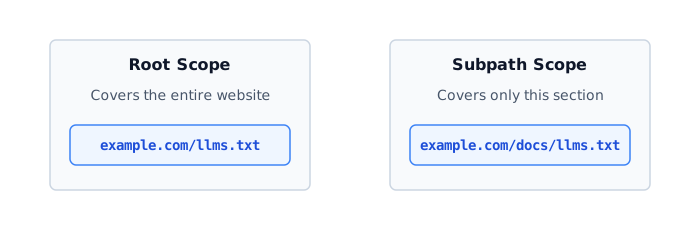
The proposal is designed for an llms.txt file at the root of a website, such as /llms.txt. The specification also allows the file to appear in a subpath when it is intended to describe that part of a site.
The exact discovery and processing behavior depends on the tool consuming the file.
What does the proposal leave to the consumer?
The proposal describes an expected workflow for agents that support the format, but it does not mean every AI system implements or follows that workflow.
A supporting consumer can still determine:
- how it searches the file
- how it prioritizes the listed resources
- how it retrieves linked content
- how it uses that content
Support and behavior vary between consumers. Publishing llms.txt does not guarantee that an AI tool will discover or use it.
That makes the publisher’s choices especially important: the proposal can provide structure, but the usefulness of the file depends largely on which resources you choose to include and how you organize them.
Choosing and organizing resources
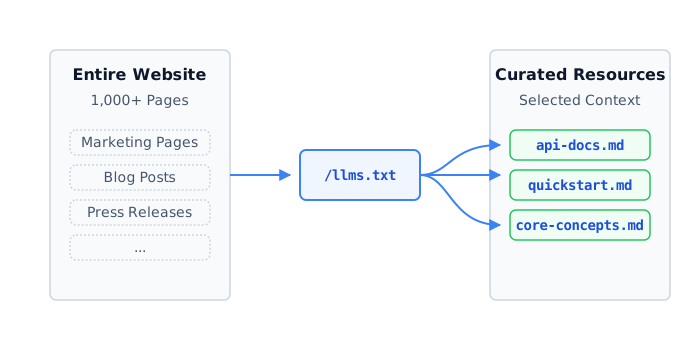
The value of llms.txt comes from selection. It should not simply repeat the sitemap.
If almost every URL on your site belongs in the file, you probably have not done enough selection. The proposal does not dictate which resources must be listed. As a practical framework, you can use these guidelines to decide what to include:
Usually include
- documentation home
- getting started
- authentication
- core concepts
- API reference
- SDK documentation
- important configuration or setup guides
Consider including
- migration guides
- troubleshooting
- architecture guides
- changelogs
- advanced topics
Usually leave out
- duplicate pages
- search result pages
- archives
- expired documentation
- thin pages
- private resources
The exact list depends on the site. A developer platform might prioritise authentication and API references, while a product with extensive user documentation might prioritise setup guides and core concepts. The important question is not “What pages do I have?” but “Which pages would help someone understand or use this site?”
Group related pages together, and put foundational pages before advanced pages. Do not automatically sort everything alphabetically if another order is more useful. The order should help a reader or consumer understand where to begin.
For example:
Getting started
Authentication
Core concepts
API reference
Advanced topics
Related context-file conventions
Some tools and implementations generate additional context files alongside llms.txt. Depending on the implementation, these may combine or expand linked resources into a larger document. Examples include names such as llms-ctx.txt, llms-ctx-full.txt, or llms-full.txt.
File names and behavior vary between implementations, so these files should not be treated as part of the core llms.txt format unless the relevant tool documents them.
An index file (llms.txt)
- smaller starting file
- more selective
- may require additional requests
A full-content context file (e.g., llms-full.txt)
- provides more content in a single file
- potentially larger
- can contain unnecessary content
- requires more care to keep current
Does it help with SEO?
llms.txt is not a known Google ranking factor.
Google explicitly says that llms.txt is not used to improve visibility or rankings in Google Search, including its generative AI features. Google recommends focusing on the same foundational SEO practices that apply to Search more broadly.
llms.txt may be useful for AI tools that choose to support it, but that is different from improving rankings in Google Search.
If your only reason for creating llms.txt is to improve Google rankings, it should not be a priority. If you already maintain substantial public documentation and want to make it easier for compatible AI tools to find important resources, it may be worth considering.
How do you implement it?
Generate the file from the same source that powers your public documentation whenever possible.
Content
   +
Metadata
   ↓
Selection
   ↓
Grouping
   ↓
Ordering
   ↓
llms.txt
Here is a language-agnostic outline of the generation logic. The exact code will depend on your framework, but the focus should be on using your content’s metadata to group and sort the resources properly. These metadata fields (section, priority, isDraft, isPrivate) are part of this example implementation, not requirements of the llms.txt proposal:
// Example generation pipeline.
// Assumes each document has metadata fields for `section` and `priority`.

function generateLlmsTxt(allDocs) {
  let content = `# Example Documentation\n\n`;
  content += `> Official documentation for the Example platform.\n\n`;

  // 1. Filter out drafts and private pages
  const publicDocs = allDocs.filter(doc => !doc.isDraft && !doc.isPrivate);

  // 2. Organize by metadata section
  const groupedDocs = publicDocs.reduce((acc, doc) => {
    const section = doc.section ?? 'General';
    if (!acc[section]) acc[section] = [];
    acc[section].push(doc);
    return acc;
  }, {});

  // 3. Define the fixed order of core sections
  const sectionOrder = ['Start here', 'Core concepts', 'API reference'];

  // Alphabetize only uncategorized sections as a predictable fallback.
  const otherSections = Object.keys(groupedDocs)
    .filter(key => !sectionOrder.includes(key) && key !== 'Optional')
    .sort();

  // Keep 'Optional' last
  const finalOrder = [...sectionOrder, ...otherSections, 'Optional'];

  finalOrder.forEach(section => {
    if (groupedDocs[section] && groupedDocs[section].length > 0) {
      content += `## ${section}\n\n`;

      const sortedDocs = groupedDocs[section].sort((a, b) => (a.priority ?? 999) - (b.priority ?? 999));
      sortedDocs.forEach(doc => {
        const desc = doc.description ? `: ${doc.description}` : '';
        content += `- [${doc.title}](${doc.url})${desc}\n`;
      });

      content += `\n`;
    }
  });

  return content;
}
When publishing the file, make sure it is publicly accessible at the URL you intend compatible consumers to use.
Keeping it useful
A static file can quickly become outdated as your documentation changes. Manage it actively:
- generate it instead of editing it manually when possible
- avoid stale URLs
- exclude drafts and private pages
- remove or clearly label deprecated resources
- validate generated links
- regenerate when the underlying documentation changes
Before you publish
- Don’t turn it into a second sitemap.
- Don’t expose URLs that aren’t meant to be public.
- Don’t treat it as an SEO shortcut.
- Don’t assume every AI tool supports it.
- Don’t create additional full-context files unless you have a specific workflow that benefits from them.
Should you use it?
It may be worth considering if:
- you have substantial documentation
- you maintain APIs or SDKs
- your product is used by developers
- you can curate a useful set of public resources
- you can maintain the file without creating drift
It may not be worth prioritizing if:
- your site is small
- you only want SEO benefits
- you would simply duplicate your sitemap
- maintaining another representation would create more problems than value
llms.txt does not change how search engines rank your pages, and it does not guarantee that an AI tool will use your content. Its value is simpler than that: it gives compatible consumers a curated starting point instead of asking them to work out which parts of a large website matter most.
If your site has substantial public documentation and you can maintain that curated view, implementing it may be worthwhile. If not, there is little reason to create the file simply because AI is involved.

Written by
Platform Engineer and Technical Writer with 10+ years of full-stack development experience and 2+ years focused on DevOps and platform engineering.