On this page
Interaction to Next Paint (INP): Diagnosing and Optimizing Main Thread Blocking
Understand how to optimize Interaction to Next Paint (INP) by yielding to the main thread, debugging long tasks, and architectural changes.
If you monitor Google PageSpeed Insights or the Chrome User Experience Report (CrUX), you have likely encountered Interaction to Next Paint (INP) warnings.
Google officially replaced First Input Delay (FID) with INP as a Core Web Vital metric. Where FID only measured the delay of the very first interaction, INP tracks the latency of all interactions across the entire lifespan of the page, reporting the worst (or near-worst) score.
Here is a detailed technical guide to understanding how the browser main thread schedules tasks, exactly why INP regressions occur, and the architectural patterns required to fix them.
The Three Phases of an Interaction
When a user interacts with a page (via click, tap, or keypress), the resulting visual update is blocked until the browser completes a sequence of operations. This sequence is broken down into three distinct phases:
- Input Delay: The time between the physical user action and the browser executing the associated event handlers. This delay is usually caused by the main thread being blocked by a completely unrelated, currently executing long task.
- Processing Time: The time taken to execute the JavaScript event handlers themselves.
- Presentation Delay: The time the browser takes to calculate style recalculations, layout shifts, paint, and composite the new frame.
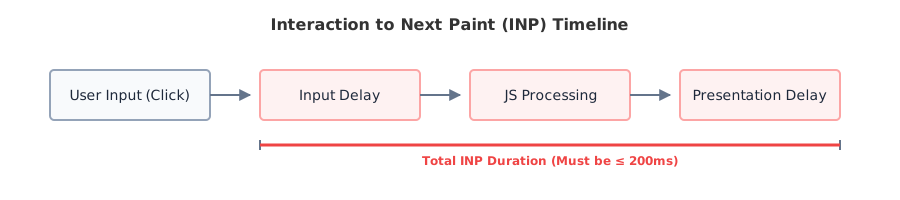
To achieve a “good” INP according to Core Web Vitals, pages should aim for an INP of 200 ms or less at the 75th percentile of page visits.
Why INP Fails: The Main Thread Bottleneck
Although modern browsers use multiple internal threads (such as compositor, raster, and networking threads), JavaScript execution and most DOM, style, and layout work occur on the main thread. When that thread is blocked by a long-running task, the browser cannot promptly respond to user input or render updates.
Tasks that execute for longer than 50ms are officially classified as Long Tasks.
The Browser Event Loop
JavaScript does not execute continuously. Instead, the browser processes work through an event loop that repeatedly:
- Executes one task from the task queue.
- Runs pending microtasks.
- Renders a frame if needed.
- Handles user input.
- Repeats.
When a single task occupies the main thread for hundreds of milliseconds, the browser cannot return to the event loop to process input or paint the next frame. APIs such as scheduler.yield() improve responsiveness by voluntarily returning control to the event loop before continuing additional work.
Diagnosing Long Tasks
You cannot optimize INP by guessing. You must profile the main thread.
Lab vs. Field Data: Many developers are confused when Lighthouse reports a good INP but CrUX reports a poor one. Lighthouse is a lab simulation run on a clean browser. CrUX is field data measured from actual users (who may have slow devices or many browser extensions). Always optimize for the field data.
To diagnose in the lab:
- Open Chrome DevTools > Performance panel or Performance Insights panel.
- Check the Web Vitals checkbox. (You can also use the Live Core Web Vitals overlay).
- Start a recording and interact with the page.
- Stop the recording and look for red-striped blocks in the Main track. These indicate Long Tasks.
- In the Interactions track, hover over the logged interaction to see the exact breakdown of Input Delay, Processing Time, and Presentation Delay.
Framework Implications
INP issues today are often caused by frontend frameworks rather than vanilla JavaScript. A short note on common culprits:
- React: Unnecessary rerenders or expensive Context updates blocking the thread.
- Vue: Expensive reactive cascades.
- Angular: Heavy change detection cycles.
- General: Excessively large component trees, regardless of framework.
Architectural Solutions for INP
To resolve INP issues, you must restructure how your application schedules work.
1. Yielding to the Main Thread
If you have a massive array of data to process, do not run it in a single continuous for loop. You must break the work into smaller chunks and explicitly yield control back to the browser so it can render pending interactions.
Historically, developers used setTimeout(() => {}, 0) to yield. Today, modern browsers support scheduler.yield().
async function processMassiveData(items) {
  for (let i = 0; i < items.length; i++) {
    // Process one chunk of work
    computeHeavyTask(items[i]);

    // Periodically yield back to the browser's main thread
    if (i % 50 === 0 && 'scheduler' in window) {
      await scheduler.yield();
    }
  }
}
The Prioritized Task Scheduling API also introduces scheduler.postTask(), allowing applications to schedule work with priorities such as user-blocking, user-visible, and background. While browser support is still evolving, it provides a more expressive scheduling model than setTimeout().
[!NOTE] Browser Support: Because the Prioritized Task Scheduling API is still being adopted across browsers, production applications should feature-detect these APIs (
'scheduler' in window) and provide fallbacks where necessary.
2. Moving Work to Web Workers
If the processing logic is extremely heavy (e.g., sorting 10,000 products, complex client-side search, or image manipulation), do not run it on the main thread at all. Move it to a Web Worker.
Web Workers execute in a separate background thread. They cannot access the DOM, but they can perform intense CPU operations while the main thread remains instantly responsive to user clicks.
3. Avoiding Layout Thrashing
If your INP failure is driven primarily by Presentation Delay, the issue is likely DOM thrashing.
If your JavaScript repeatedly reads a layout property (like element.offsetHeight) and immediately writes to a layout property (like element.style.height) within a loop, you force the browser to synchronously recalculate the entire page layout multiple times per frame.
Solution: Read all layout properties first, then batch all DOM writes at the end. Use requestAnimationFrame() to perfectly sync visual updates with the browser’s rendering cycle.
Which Approach Should You Choose?
| Scenario | Primary Bottleneck | Recommendation |
|---|---|---|
| Heavy UI Rendering (e.g., React Context churn) | Processing Time | Component memoization, chunked rendering, yield to main thread. |
| Complex Math / Data Sorting | Input / Processing Delay | Move logic entirely off the main thread into a Web Worker. |
| Third-Party Ads/Analytics | Input Delay | Defer third-party scripts until requestIdleCallback or user interaction. |
| Slow CSS Animations / Resizing | Presentation Delay | Stop reading/writing DOM in loops. Use CSS transforms (translate, scale) instead of layout properties (width, top). |
Scheduling API Comparison
| API | Best Used For |
|---|---|
setTimeout() | Legacy deferral |
requestAnimationFrame() | Visual updates |
requestIdleCallback() | Non-critical background work |
scheduler.yield() | Breaking long tasks |
scheduler.postTask() | Priority scheduling |
| Web Workers | Heavy CPU computation |
Architecture Summary
A healthy, INP-optimized frontend architecture relies on asynchronous task chunking and off-main-thread processing:

Glossary
- INP (Interaction to Next Paint): A metric tracking the latency of all interactions across the page lifecycle.
- FID (First Input Delay): The deprecated predecessor to INP that only measured the input delay of the very first interaction.
- Long Task: Any JavaScript execution that blocks the main thread for more than 50 milliseconds.
- scheduler.yield(): A modern web API that allows developers to voluntarily pause a JavaScript function to let the browser process urgent user inputs.
Specification Status
| Technology | Status |
|---|---|
| Interaction to Next Paint (INP) | Core Web Vital |
| Web Workers | Web Standard |
| requestAnimationFrame | Web Standard |
| scheduler.yield() | Emerging API |
| scheduler.postTask() | Emerging API |
Revision History
2026-07
- Initial documentation for Interaction to Next Paint.
- Added guidance on
scheduler.yield()and Web Worker offloading.
References
- Optimize Interaction to Next Paint (web.dev)
- Prioritized Task Scheduling API (MDN)
- Web Workers API (MDN)
From the team at
We build digital products and explore the modern web standards behind them.